First, pick PNG for single images that live on screens. Pick PDF instead for documents, printing, and files with several pages.
PNG stores one picture, so it suits screenshots, logos, and transparent graphics. PDF holds a whole document, so it suits files you share, sign, print, or archive.
The sections below explain the trade-offs in plain language. You can then choose the right format in seconds, every time.
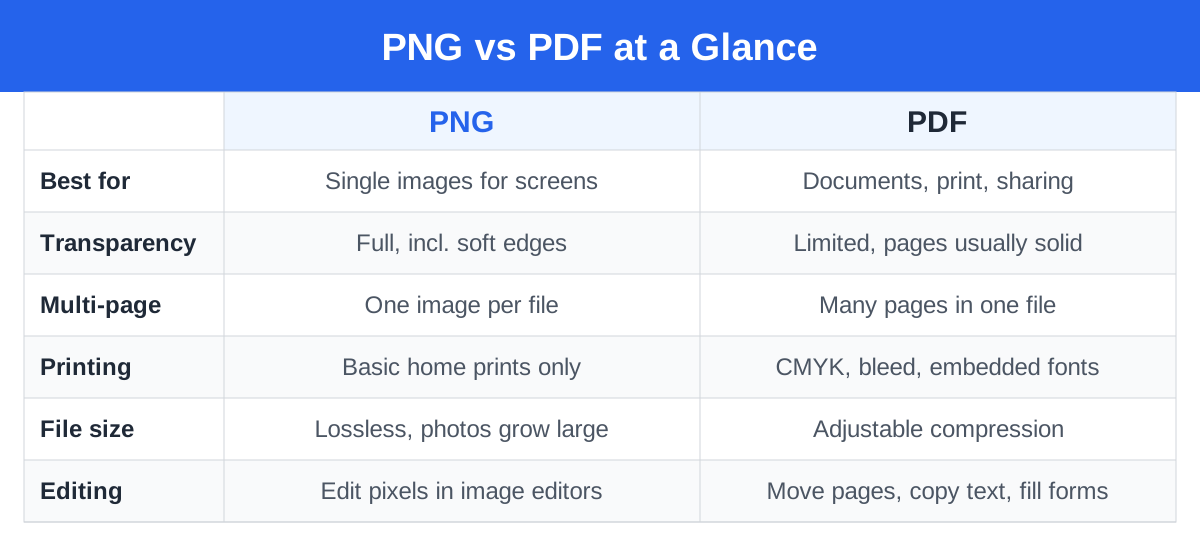
PNG vs PDF at a Glance
| Feature | PNG | |
|---|---|---|
| File type | Raster image format | Document format holding images, vector art, and live text |
| Quality and scaling | Fixed pixels; sharp at native size, blocky when enlarged | Vector art scales to any size and stays sharp |
| Transparency | Full support, including soft partial transparency | Possible inside layouts, yet pages usually show a solid background |
| File size | Lossless storage, so photos can grow large | Adjustable compression balances size against quality |
| Editing | Image editors change pixels; text becomes part of the picture | Readers and editors move pages, copy text, and fill fields |
| Printing | Handles simple home prints only | Print standard; supports CMYK, bleed, and embedded fonts |
| Web use | Browsers show PNG inline on any page | Browsers open PDF in a viewer or download it |
| Forms and text | No fields; readers cannot select the text | Fillable forms plus selectable, searchable text |
| Archiving | Suits original artwork and images | PDF/A standard targets long-term document storage |
| Security options | None built in | Passwords, permissions, and digital signatures |
What Each Format Actually Is
What Is PNG?
PNG means Portable Network Graphics. Engineers built it in the mid 1990s as a free successor to GIF.
The format stores a picture as a grid of pixels. Each pixel carries a colour value, and the file keeps every value exactly.
Lossless compression then shrinks the file without dropping data. You reopen the file later and see identical pixels.
Also, a PNG has no pages, fonts, or paragraphs. In fact, any words inside it belong to the picture itself, like paint on a canvas.
Indeed, that single focus explains its popularity. Screenshots, icons, and web graphics need one faithful image, and PNG delivers exactly that. The W3C PNG specification documents the format in full technical detail.
What Is PDF?
PDF means Portable Document Format. Adobe released it in the early 1990s, and ISO later adopted it as an open standard.
In contrast, one PDF can bundle many elements at once. It can hold live text, vector drawings, photos, links, form fields, and dozens of pages.
As a result, consistency drives the whole design. The file carries everything a screen or printer needs, so the layout looks identical everywhere.
That reliability explains its dominance in business. Invoices, contracts, manuals, and e-books almost always travel as PDFs. Adobe gives a plain overview on its What is a PDF page.
Image Quality and Resolution
The two formats treat detail very differently. Understanding that gap, then, settles most png vs pdf debates.
A PNG owns a fixed set of pixels. Stretch it beyond its native size and software must invent new pixels, so edges turn soft or blocky.
A PDF can store vector art instead. Mathematical shapes describe each line and curve, so the art stays crisp at any size.
PDFs can also hold ordinary photos and screenshots. A blurry photo stays blurry inside a PDF, because the wrap cannot add detail.
So PDF offers a higher ceiling, not a guarantee. PNG locks quality at capture time, while PDF lets vector content rise above that lock.
DPI and Print Sharpness
Printers measure sharpness in DPI, meaning dots per inch. A common rule of thumb targets about 300 DPI at the final printed size.
Screens, meanwhile, need far fewer pixels to look sharp. A graphic that fills a phone screen may still fall short on paper.
PDF files record exact page sizes in inches or millimetres. Then, you can check the DPI of each image before printing and fix problems early.
Lossless PNG vs Flexible PDF Compression
Above all, PNG compression never discards data. Shrinking happens through smarter storage alone, so detail survives intact.
That purity suits screenshots with tiny text and crisp line art. It also inflates photographs, because natural scenes resist lossless shrinking.
PDF creators, however, choose their own balance. They can keep images untouched, compress them losslessly, or apply JPEG-style lossy compression.
For example, one small PDF can suit email, while a heavier twin suits the archive. PNG offers no such dial; it always picks fidelity.
Transparency and Backgrounds
PNG wins this round outright. Its alpha channel lets each pixel range from invisible to fully solid, with every step between.
Moreover, designers exploit that freedom daily. Logos, stickers, and product cutouts float over any background colour or photograph.
Viewers can still technically render transparent elements inside PDFs. Everyday tools, though, treat a PDF page like a sheet of white paper.
Need a lone graphic with nothing behind it? Save it as PNG and place it anywhere, from slides to videos.
File Size and Compression
Overall, content decides file size more than format labels do. Still, clear patterns emerge when you compare similar files.
- Simple graphics and screenshots: PNG shines here, because flat colours compress tightly without losing detail.
- Photographs: PNG versions often balloon, while a PDF can shrink the same photo with mild lossy compression.
- Long documents: PDF wins easily, since one file holds every page plus searchable text.
Therefore, upload caps and email limits reward control. PDF gives you that control through its compression settings.
Printing: Why Print Shops Ask for PDF
Home printing forgives almost anything. For instance, you can send a PNG to a desktop printer and get a decent page.
In contrast, professional printing demands far more control. Print shops ask for PDF because the format carries production details:
- Colour: Presses run CMYK inks, not screen RGB. PDFs carry CMYK values and colour profiles, so results match expectations.
- Bleed: Edge-to-edge designs need extra margin beyond the trim line. PDF stores bleed boxes and crop marks; PNG stores neither.
- Fonts: A PDF can embed its fonts inside the file. Text then prints exactly as designed, with no surprise substitutions.
- Page size: Fixed physical dimensions prevent scaling surprises at the press.
Artwork stuck in PNG form can still reach the press. Drop it into a PDF at the correct size first, using our free PNG to PDF converter.
Web and Social Use
PNG belongs to the web. Browsers render it inline, chat apps preview it, and social platforms accept it gladly.
Transparency and sharp edges survive the upload. Logos, memes, and support screenshots all travel well in this format.
On the other hand, PDF plays a supporting role online. Websites link PDFs for menus, brochures, price lists, and manuals.
However, most social feeds refuse PDF uploads as images. A flyer trapped inside a PDF needs rescuing before you can post it.
Our PDF to PNG converter turns each page into a clean image. You can then share that image anywhere.
Documents, Forms, and Multi-Page Files
Structure belongs to PDF. Contracts, invoices, CVs, and reports read as one continuous file with pages in order.
Consequently, recipients scroll, search, and print everything in one action. Nobody juggles a folder of loose page images.
Also, forms strengthen the case further. Fillable fields, checkboxes, and signature boxes form part of the PDF standard itself.
Banks, universities, and government offices rely on those features daily. A PNG form forces printing and handwriting instead.
Editing and Converting Between Them
You edit a PNG inside an image editor. Then you crop it, retouch it, recolour it, and draw over it.
Its text resists true editing, though. Letters become pixels, so changing a word means painting over the old one.
PDF editing targets the document instead. Tools reorder pages, attach notes, fill forms, and copy original text.
Conversion between the formats happens constantly. Each direction serves a distinct job:
- PNG to PDF turns an image into a document. Portals demand it, printers prefer it, and merging several images into one ordered file needs it. Our guide on how to change a PNG to a PDF walks through each step.
- PDF to PNG turns a document page into an image. Chats, slide decks, and social posts all need images, not documents. Our guide on how to turn a PDF into a PNG covers that direction.
One warning applies to both directions. Conversion cannot invent detail or restore real text, so output quality never exceeds input quality.
Accessibility and Searchable Text
Real text inside a PDF helps many readers. Screen readers read it aloud, and visitors find words fast with Ctrl+F.
Search engines also index that text. Public documents and study guides therefore reach more people as PDFs.
Text inside a PNG, meanwhile, stays silent. Screen readers only hear its alt text, and search tools find nothing.
Scanned pages start life as images, so they share that problem. OCR software fixes it by recognising letters and adding a hidden text layer.
WebAIM publishes practical advice in its PDF accessibility guide. It explains tags, reading order, and other essentials clearly.
Long-Term Archiving
Serious archives use a special PDF variant called PDF/A. The ISO standard behind it targets documents that must survive decades.
PDF/A files embed their fonts and colour data. They also ban features that rely on outside files or software.
Therefore, governments and law firms archive records this way. Tax files, certificates, and contracts commonly end up as PDF/A.
PNG also ages well, thanks to its open and stable design. Archive original artwork and photographs as PNG at full resolution.
The simple rule: documents belong in PDF or PDF/A, while pictures belong in PNG. Adobe lists the related standards on its PDF standards page.
Which Should You Use? Common Scenarios
- Screenshot: Choose PNG. Text stays legible, files stay modest, and every app accepts the format.
- Logo: Choose PNG for screens, especially with a transparent background. Keep a vector master, often inside a PDF, for print work.
- Photo: Reach for JPEG first in daily life. Between these two, share or print it inside a PDF and avoid heavy PNG files.
- Scanned document: Choose PDF. One file keeps pages ordered, and OCR can add searchable text later.
- Printable flyer: Choose PDF with bleed and CMYK settings. Send the printer a production file, not raw PNG artwork.
- E-book or report: Choose PDF. Layout, fonts, and page order survive every device intact.
- Form: Choose PDF. Only it supports fillable fields, checkboxes, and digital signatures.
Frequently Asked Questions
Is PNG or PDF better quality?
In short, neither format guarantees better quality. PNG preserves every pixel exactly, so it never loses detail.
PDF matches that fidelity with careful settings. It surpasses PNG with vector content, because shapes stay sharp at every size.
Does converting PNG to PDF reduce quality?
Good converters avoid quality loss entirely. They place the original image inside the PDF without squeezing it again.
Weak tools may downscale images or apply harsh compression. Check the settings before you trust a converter with important files.
Why do PNG files grow so large?
Still, lossless compression has limits with photographs. Natural scenes contain endless tiny variations, and PNG must store them all.
PDF sidesteps the problem through lossy compression. It discards subtle detail that eyes barely notice and shrinks the file dramatically.
Can a PDF have a transparent background?
Design software can, however, build transparent elements into a PDF. Viewers still present each page as a finished sheet, usually white.
Standalone transparent graphics belong in PNG. The format handles cutouts and overlays far more predictably.
Which format prints better, PNG or PDF?
Print shops strongly prefer PDF. It carries exact sizes, embedded fonts, CMYK colour, and bleed settings.
PNG suits quick home printing. Converting it to PDF at the right size first smooths any professional handoff.
Can I combine several PNG images into one PDF?
Yes. In fact, people do it constantly. Receipts, scanned pages, and photo sets all become tidier inside one file.
A single PDF keeps every image in order. You avoid sending a loose bundle of attachments.
Which format is safer to share online?
PDF gives you real protection options. You can add a password, block copying or printing, and sign the file digitally.
PNG offers no built-in protection at all. Anyone who gets the file can open, copy, and share it freely.
So send sensitive documents as PDF. Contracts, ID scans, and financial papers all deserve that extra control.
Conclusion
These formats solve different problems, so neither truly replaces the other. PNG delivers one faithful, transparent image for screens.
PDF delivers a dependable document for printing, sharing, signing, and archiving. Match the format to the job in front of you.
Jobs change, and conversion takes seconds. Try our free PNG to PDF converter or the PDF to PNG converter whenever you need to switch.
Both tools run entirely in your browser. They handle up to 50 files at once and ask for no sign-up.
Need to switch formats now?
Convert PNG images into a polished PDF, or turn PDF pages back into PNG images. It is free, runs in your browser, and needs no sign-up.
Open the free converter